|


What is E-Way Bill: Rules, Applicability, Limit, Requirement & Generation Process Explained
An e-way bill is a mandatory electronic document required under GST for transporting goods valued above Rs. 50,000. It should be generated on the government portal before movement begins, and applies to all registered persons, transporters, and in specific cases, unregistered persons. Any non-compliance attracts a penalty of Rs.10,000 or the tax evaded, whichever is higher.
Key Takeaways
- The standard threshold is Rs. 50,000 for interstate movement. Intrastate limits vary by state, several states have set higher limits (up to Rs. 2,00,000).
- e-Way Bills can only be generated for documents dated within 180 days from the date of generation. This is applicable from 1st January 2025.
- Validity is 1 day per 200 km for regular cargo and 1 day per 20 km for Over Dimensional Cargo (ODC).
- e-Way Bill validity extensions are capped at 360 days from the original generation date.
- Penalty for non-compliance: Rs. 10,000 or the tax amount sought to be evaded, whichever is higher, along with possibility of goods detention and vehicle seizure.
What is an E-Way Bill?
An Electronic Way Bill (e-Way Bill) is a compliance document required under Section 68 of the GST Act, read with Rule 138 of the CGST Rules, 2017. It must be generated on the common GST e-Way Bill portal before transporting goods whose consignment value exceeds Rs. 50,000.
Once generated, a unique E-Way Bill Number (EBN) is assigned and shared with the supplier, recipient, and transporter. The person in charge of the conveyance must carry this EBN, either as a printout or in electronic form during the movement of goods.
The e-way bill can be generated via:
- Web portal: ewaybillgst.gov.in (Portal 1) or ewaybill2.gst.gov.in (live from 1st July 2025)
- SMS via registered mobile number
- Android App for registered taxpayers and enrolled transporters
- Bulk generation via JSON file upload, suited for high-volume businesses
- API integration: A direct system-to-system generation for enterprises with thousands of invoices in a day
E-Way Bill Applicability
An e-way bill is required when goods are moved in a vehicle or conveyance where:
- The value of a single consignment (invoice/bill/delivery challan) exceeds Rs. 50,000, OR
- The aggregate value of all consignments in a vehicle exceeds Rs. 50,000
This applies for movement related to:
- A supply (sale, barter, or transfer with or without consideration)
- Movement for reasons other than supply (e.g., sales return, branch transfer)
- Purchases from an unregistered person
Mandatory even if value is below Rs. 50,000:
- Inter-state movement of goods by a principal to a job-worker (or by a registered job-worker back to the principal)
- Inter-state transport of handicraft goods by a dealer exempted from GST registration
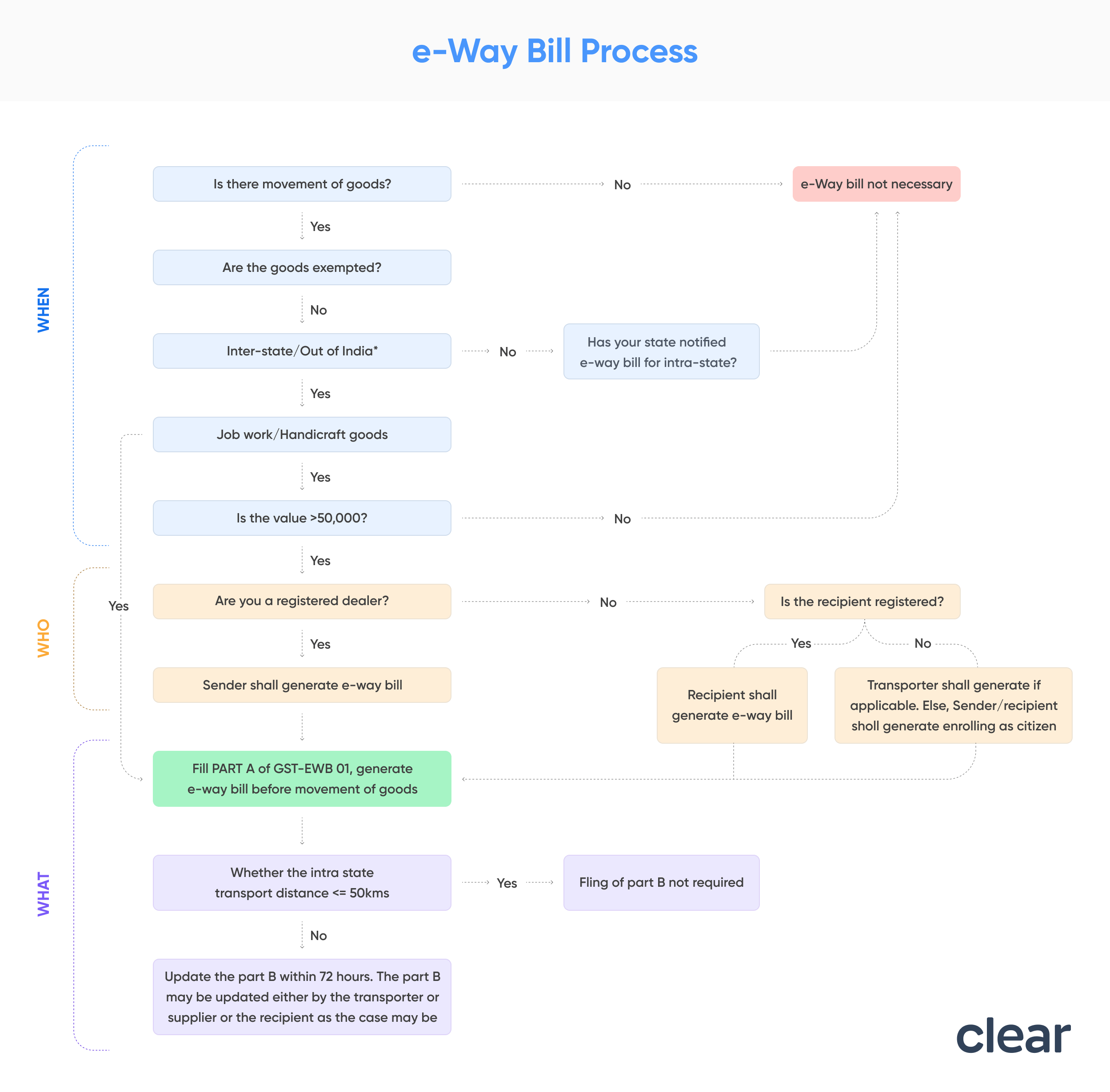
*Generate e-way bill irrespective of the value of consignment.
E-Way Bill Limit: State-wise Threshold Limits
The standard inter-state e-way bill threshold is Rs. 50,000, uniformly applicable across India. For intra-state movement, states have the discretion to set their own limits.
State | Intrastate E-Way Bill Threshold | Notes |
Andhra Pradesh | Rs. 50,000 | All taxable goods |
Bihar | Rs. 1,00,000 | Above this limit for intrastate movement |
Chhattisgarh | Rs. 50,000 | Only for 15 notified goods; no e-way bill for other intrastate goods |
Delhi | Rs. 1,00,000 | Above this limit for intrastate movement |
Goa | Rs. 50,000 | Only for 22 specified goods |
Gujarat | Rs. 50,000 | No e-way bill for Hank, Yarn, Fabric, Garments (intrastate); no e-way bill for inter-city movement (from 1st Oct 2018) |
Haryana | Rs. 50,000 | All taxable goods |
Himachal Pradesh | Rs. 50,000 | All goods |
Jammu & Kashmir | No intrastate e-way bill required | Rs. 50,000 for interstate movement |
Jharkhand | Rs. 1,00,000 | Except specified goods |
Karnataka | Rs. 50,000 | All taxable goods |
Kerala | Rs. 50,000 | No e-way bill for intrastate except gold (mandatory from 20th Jan 2025) |
Madhya Pradesh | Rs. 1,00,000 | Except tobacco, pan masala, medicines, surgical goods, APIs |
Maharashtra | Rs. 1,00,000 | Intrastate; Rs. 50,000 for interstate |
Manipur | Rs. 50,000 | All taxable goods |
Meghalaya | Rs. 50,000 | All taxable goods |
Odisha | Rs. 50,000 | All taxable goods |
Punjab | Rs. 1,00,000 | Intrastate; Rs. 50,000 for interstate |
Rajasthan | Rs. 2,00,000 | Within city (except specified goods); Rs. 1,00,000 for intrastate |
Tamil Nadu | Rs. 1,00,000 | Intrastate; Rs. 50,000 for interstate |
Telangana | Rs. 50,000 | All taxable goods |
Uttar Pradesh | Rs. 50,000 | All taxable goods |
Uttarakhand | Rs. 50,000 | All taxable goods |
West Bengal | Rs. 50,000 | Intrastate (reduced from Rs. 1,00,000 from 1st Dec 2023) |
For the complete and most current state-wise list, refer to: State-Wise E-Way Bill Threshold Limits
Who Should Generate an E-Way Bill?
Who | Obligation | Form |
Registered Supplier (Consignor) | Before movement of goods exceeding Rs. 50,000 | Fill Part A of Form GST EWB-01 |
Registered Recipient (Consignee) | If acting as the transporter (own or hired vehicle) | Fill Part A + Part B of Form GST EWB-01 |
Transporter (Registered or Enrolled) | If the supplier/recipient has not generated the e-way bill | Generate EWB based on Part A information from the registered person |
Unregistered Transporter | Must enrol on the e-way bill portal to obtain a Transporter ID (TRANSIN) | Generate EWB on behalf of clients after enrolment |
Unregistered Supplier → Registered Recipient | The registered recipient is responsible for compliance, as if they were the supplier | Recipient ensures EWB generation |
Key rule for transporters carrying multiple consignments: If individual consignment value is ≤ Rs. 50,000 but aggregate value in the vehicle exceeds Rs. 50,000, the transporter is not required to generate an e-way bill. However, a Consolidated E-Way Bill (Form GST EWB-02) can be generated for multiple consignments in one vehicle.
When is an E-Way Bill Not Required
e-Way Bill generation is not mandatory in the following cases:
- Goods transported by a non-motorised vehicle (e.g., hand cart, animal-drawn vehicle)
- Goods moved from Customs port, airport, air cargo complex, or land customs station to an Inland Container Depot (ICD) or Container Freight Station (CFS) for Customs clearance
- Goods transported under Customs supervision or Customs seal
- Goods transported under Customs Bond from ICD to Customs port or between Customs stations
- Transit cargo transported to or from Nepal or Bhutan
- Goods moved by defence formations under the Ministry of Defence as consignor or consignee
- Empty cargo containers being transported
- Consignor transporting goods to/from a weighbridge within 20 km, accompanied by a delivery challan
- Goods transported by rail where the consignor is the Central Government, State Government, or a local authority
- Goods specified as exempt from e-way bill requirements under the respective State/UT GST rules
- Exempted goods as per Annexure to Rule 138(14), goods treated as no supply under Schedule III, and certain Central Tax Rate notification
Note: Part B of e-way bill is not required if the distance between the consigner or consignee and the transporter is less than 50 kms within the same state.
What are the Components of an E-Way Bill?
An e-way bill (Form GST EWB-01) is divided into two parts:
E-Way bill is divided into two components i.e. Part A and Part B. The person required to issue eway bill should fill in the following details of
Part A - Consignment Details (filled by the supplier, recipient, or transporter):
- Details of GSTIN of recipient
- Place of delivery (PIN Code)
- Invoice or challan number and date
- Value of goods
- HSN code
- Transport document number (Goods Receipt Number/ Railway Receipt Number/ Airway Bill Number/ Bill of Lading Number)
- Reasons for transportation
Part B - Transporter Details (filled by the transporter or the person in charge of conveyance):
- Vehicle number (for road transport)
- Transporter ID and transport document details (for rail, air, or ship)
e-Way Bill validity starts only when Part B is entered for the first time. Part B cannot be entered for the same entry again once it has been submitted; only the vehicle number can be updated.
Documents Required for e-Way Bill Generation
Mode of Transport | Documents Required |
All modes | Invoice / Bill of Supply / Delivery Challan related to the consignment |
Road | Transporter ID (GSTIN or TRANSIN) or Vehicle Registration Number |
Rail, Air, or Ship | Transporter ID + Transport Document Number + Date of the transport document |
Pre-requisites before generating an e-way bill:
- Valid GSTIN and active registration on the GST portal
- Registered account on ewaybillgst.gov.in (separate from GST portal login)
- 2FA (Multi-Factor Authentication) enabled; mandatory for all taxpayers from 1st April 2025
- GST account must be active (not suspended)
How to Generate an E-Way Bill?
E-Way Bills can be generated on E-Way Bill Portal 1 (ewaybillgst.gov.in) or E-Way Bill Portal 2 (ewaybill2.gst.gov.in, operational from 1st July 2025). Both portals are real-time synchronised.
Step 1: Log in to ewaybillgst.gov.in using your GSTIN-based credentials. Authenticate via 2FA (OTP on registered mobile number).
Step 2: Go to E-Way Bill > Generate New.
Step 3: Select the transaction type (Outward/Inward) and sub-type (Supply, Export, Job Work, etc.). Enter the document details, goods details (HSN, value, quantity), and recipient's GSTIN.
Step 4: Enter the transporter's GSTIN/TRANSIN or vehicle number in Part B.
Step 5: Submit. A unique E-Way Bill Number (EBN) is generated. Print or save the EBN electronically.
For a complete step-by-step guide with screenshots: How to Generate E-Way Bill Online
Other generation methods:
- SMS-based generation via registered mobile
- Android App: Registered IMEI-based access for taxpayers and transporters
- Bulk generation: Upload JSON file for multiple invoices in one go (suitable for high-volume operations)
- API integration: Direct ERP/IT system integration for enterprises with high daily invoice volumes
SMS E-Way Bill Generation on Mobile
Registered taxpayers and transporters can generate, manage, and cancel e-way bills via SMS, without logging into the portal.
To enable SMS-based generation:
- Register the mobile number on the e-way bill portal under Registration > For SMS.
- Send pre-defined SMS codes to the GSTN's designated mobile number.
For detailed SMS command formats and the step-by-step process, refer to: Generate E-Way Bill via SMS
Time Limit to Generate E-Way Bill
Effective 1st January 2025, e-way bills can only be generated for documents (invoices, delivery challans, etc.) dated within 180 days from the date of e-way bill generation.
What this means in practice:
- An e-way bill generated on 1st March 2025 can only be raised against documents dated on or after 3rd September 2024.
- Documents older than 180 days are ineligible for e-way bill generation.
This rule was introduced to prevent the generation of e-Way Bills for stale or backdated documents and is in line with the GSTN advisory dated 17th December 2024.
Validity of E-Way Bill
E-Way Bill validity is calculated from the date and time of the first Part B entry (i.e., first vehicle or transport document number entry). Validity expires at midnight on the last day.
| Type of conveyance | Distance | Validity of EWB |
Other than Over dimensional cargo | Less Than 200 Kms | 1 Day |
| For every additional 200 Kms or part thereof | additional 1 Day | |
For Over dimensional cargo | Less Than 20 Kms | 1 Day |
| For every additional 20 Kms or part thereof | additional 1 Day |
Example: For a consignment travelling 310 km by regular vehicle: validity = 1 (first 200 km) + 1 (remaining 110 km, which is part of the next 200 km bracket) = 2 days.
Extending validity:
- The transporter can extend validity up to 8 hours before or 8 hours after expiry, by providing the reason (natural calamity, law and order issues, trans-shipment delay, vehicle breakdown, etc.) and updated Part B details.
- Effective 1st January 2025, extensions are capped at 360 days from the original date of generation.
Note: If the e-way bill expires, goods must not be moved until validity is extended or a new e-way bill is generated.
e-Way Bill for Different Types of Transactions
Transaction Type | E-Way Bill Requirement |
Outward supply (sale): Interstate | Required if value > Rs. 50,000 |
Outward supply (sale): Intrastate | Required as per state-specific threshold |
Branch/stock transfer | Required (supply without consideration) |
Sales return | Required (generate with sub-type "Sales Return") |
Job work (interstate) | Required regardless of value |
Job work (intrastate) | As per state threshold |
Imports (goods reaching India) | Required from port/ICD to destination; distance calculated within India only |
Export | Required from consignor's place to port/customs point of exit |
Goods on consignment / CKD/SKD mode | Separate e-way bill for each delivery challan per vehicle |
Bill to / Ship to transactions | Both billing address (GSTIN) and shipping address must be entered in the EWB form |
Multiple invoices (Same consignor and consignee) | Separate EWBs per invoice; can then be clubbed into a Consolidated EWB |
E-Way Bill for Unregistered Persons
Unregistered persons are also subject to e-way bill requirements under specific circumstances:
- Unregistered supplier to Registered recipient: The registered recipient is responsible for generating the e-way bill as if they were the supplier. End to end compliance must be ensured.
- Unregistered supplier to Unregistered recipient: The unregistered person can enrol on the e-way bill portal as a citizen and generate the e-way bill themselves.
- Handicraft goods dealers (exempt from GST registration): Must generate an e-way bill for inter-state transport of handicraft goods regardless of consignment value, as per the fourth proviso to Rule 138(1).
- Unregistered transporters: Must enroll on the e-way bill portal to obtain a TRANSIN (15-digit Transporter ID), which clients can use while generating e-way bills on their behalf.
Penalty for Non-Compliance with E-Way Bill Rules
Violation | Penalty |
Transporting goods without a valid e-way bill | Rs. 10,000 or the tax amount sought to be evaded, whichever is higher |
Transporter failing to generate e-way bill when required | Rs. 10,000 or tax evaded (whichever is higher) |
Non-compliance under CGST Rule 18(1) (display violations) | Up to Rs. 25,000 |
Goods being transported without e-way bill | Risk of detention, seizure of goods, and confiscation of the vehicle |
Officers have the authority to intercept any vehicle in transit for verification. The person in charge of the conveyance must produce the e-way bill number (digitally or as a printout) on demand.
For a detailed breakdown: Consequences of Non-Generation of E-Way Bill
Common Errors in E-Way Bill Generation
Error | Cause | Resolution |
Invalid GSTIN | Incorrect GSTIN entered for consignor/consignee | Enter 'URP' for unregistered persons; verify GSTIN via GST Search tool |
Distance not available | PIN-to-PIN distance not in NIC database | Enter ‘0’, if NIC has data, it will auto-fill; if not, enter the actual distance manually |
Same PIN code error | Source and destination PIN codes are identical | Enter actual distance (must be within 100 km); e-way bill cannot be generated with identical PIN codes |
Invalid vehicle number format | Vehicle number entered in non-standard format | Follow the prescribed format (e.g., KA01AB1234 for TN10DE0045-style numbers); refer to the portal's format guide |
Part-A Slip generated instead of EWB | Part B details (vehicle number or transport document number) not entered | Enter Part B details to convert the Part-A Slip into a complete e-way bill |
Cannot edit generated e-way bill | EWBs cannot be edited once generated | Cancel within 24 hours (if not verified by an officer) and regenerate with correct details |
Portal login failure after multiple attempts | Account blocked after 5 incorrect login attempts | Wait 5 minutes; use 'Forgot Password' to reset credentials |
Frequently Asked Questions


Clear offers taxation & financial solutions to individuals, businesses, organizations & chartered accountants in India. Clear serves 1.5+ Million happy customers, 20000+ CAs & tax experts & 10000+ businesses across India.
Efiling Income Tax Returns(ITR) is made easy with Clear platform. Just upload your form 16, claim your deductions and get your acknowledgment number online. You can efile income tax return on your income from salary, house property, capital gains, business & profession and income from other sources. Further you can also file TDS returns, generate Form-16, use our Tax Calculator software, claim HRA, check refund status and generate rent receipts for Income Tax Filing.
CAs, experts and businesses can get GST ready with Clear GST software & certification course. Our GST Software helps CAs, tax experts & business to manage returns & invoices in an easy manner. Our Goods & Services Tax course includes tutorial videos, guides and expert assistance to help you in mastering Goods and Services Tax. Clear can also help you in getting your business registered for Goods & Services Tax Law.
Save taxes with Clear by investing in tax saving mutual funds (ELSS) online. Our experts suggest the best funds and you can get high returns by investing directly or through SIP. Download Black by ClearTax App to file returns from your mobile phone.
Office Address - Defmacro Software Private Limited, C 245A, Ground floor, Room No 1, Vikas Puri, West Delhi, New Delhi, Delhi 110018, India
Cleartax is a product by Defmacro Software Pvt. Ltd.

ISO 27001
Data Center

SSL Certified Site
128-bit encryption